NEW · AI TOOL OF THE DAY · 18 NOVEMBER 2026
AI by Zapier: The Automation That Can Think Before It Clicks
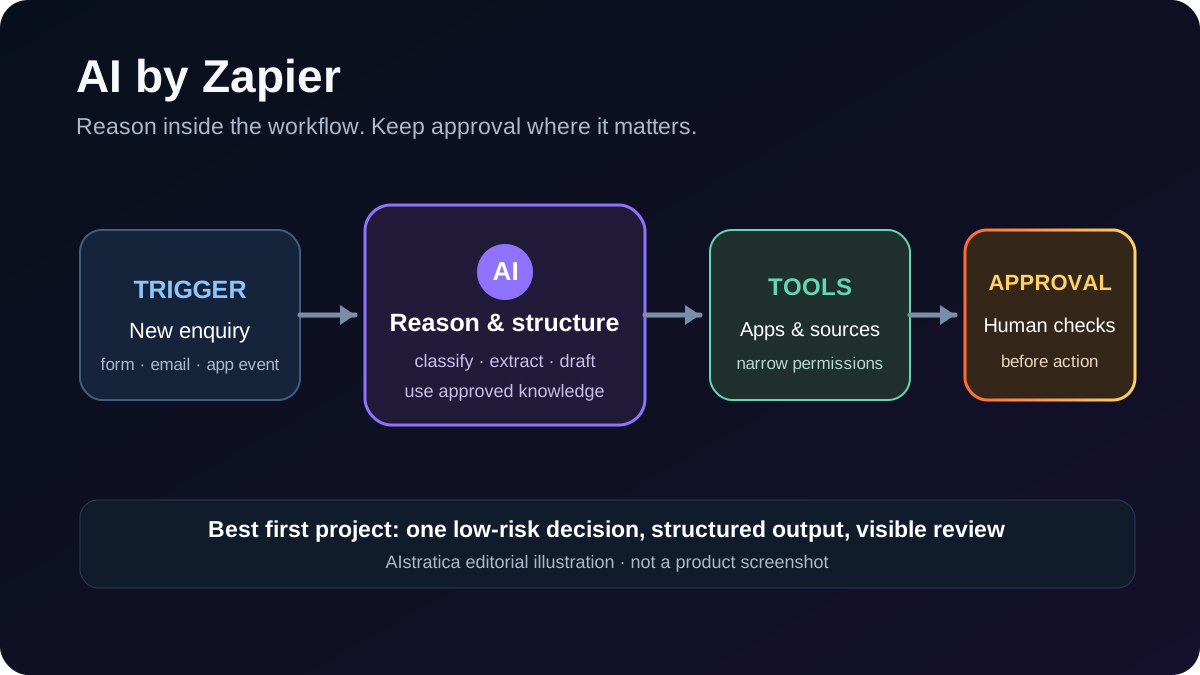
Your inbox receives a new customer enquiry. The message mentions a company, a budget, a deadline and three slightly contradictory requests. A normal automation can copy the email into a spreadsheet. A useful AI workflow can first decide what the customer actually needs, extract the important details, flag missing information and prepare a sensible reply for approval.
That difference is the reason AI by Zapier is interesting. It places an AI step inside a Zap—the company’s name for an automated workflow—so a model can analyse information, return structured fields and, on paid plans, use connected apps and knowledge sources as tools.
It can save repetitive work. It can also confidently move the wrong information into the wrong system if the workflow is vague. Think of it as a capable new colleague who joined on Monday: give it a narrow job, clear rules and supervision before handing over the office keys.
This is a documentation-based review. AIstratica did not conduct a controlled hands-on performance test.
What AI by Zapier actually does
AI by Zapier is a step inside the Zap editor. It can receive information from an earlier step, apply a prompt and return one combined answer or named output fields that later steps can use.
Zapier's documentation says the current version can also use app actions and knowledge sources as tools. That turns a simple text-processing step into an agentic one: the model can decide which permitted tool to call while the wider Zap still provides a predictable trigger and follow-up actions.
For example, a workflow could:
- start when a sales form is submitted;
- ask AI by Zapier to classify the request and extract budget, deadline and product interest;
- check an approved knowledge source for the relevant service information;
- create a draft response; and
- send the draft to a human for review before anything reaches the customer.
The AI is useful where judgment is needed. The ordinary Zap remains useful where a fixed rule is safer. You do not need artificial intelligence to move a date from one column to another. Using a frontier model for that is rather like hiring a lawyer to operate the photocopier.
Where it can help
Turn untidy messages into clean records
Customer emails rarely arrive as perfect database fields. AI by Zapier can extract names, issues, urgency and requested actions into structured outputs. Those fields can then be mapped into a CRM, spreadsheet or ticketing system.
The limitation is straightforward: extraction can be wrong. Require key identifiers to come directly from the source and route uncertain cases to a person.
Summarise meetings without losing the action list
A transcript can be converted into a short summary, decisions, owners and deadlines. The useful part is not the paragraph saying everyone had a productive discussion; it is the structured list showing who promised what.
For sensitive meetings, check whether uploading the transcript is permitted by your organisation and whether the selected AI provider and retention settings meet your requirements.
Draft replies using approved information
The step can combine a customer question with a connected knowledge source and produce a draft. This is safer than asking it to improvise from general model knowledge, although retrieval does not guarantee correctness.
Zapier currently lists limits for knowledge sources. Individual files and documents must be supported, each step can use up to 20 sources and several source types have a 96,000-word ceiling. Google Docs must be added individually; the step cannot simply absorb an entire Drive.
Let an agent act, with approval where it matters
App actions can be exposed as tools. Zapier also provides a Require approval before running setting for each tool. When enabled, the run pauses before that tool acts.
That switch is off by default. Turn it on for actions that create, update, send or delete information. An automated draft is convenient. An automated apology email sent to 4,000 customers because one field was mapped incorrectly is a company meeting nobody wants.
Try it in 20 minutes: build a careful enquiry triage
Use a low-risk test form and sample data rather than a live customer inbox.
- Choose the trigger. Start a Zap when a new test form response arrives.
- Add AI by Zapier. Pass the message into the prompt and ask for five outputs: enquiry type, urgency, company, requested deadline and missing information.
- Define the rules. Tell the step to use only the submitted text, return
unknownwhen a fact is absent and avoid inventing contact details. - Add one controlled tool. If useful, connect an approved service-information document. Do not expose unrelated folders.
- Create a review step. Put the result in a private spreadsheet or draft queue. Require human approval before any external message is sent.
- Test awkward examples. Include a vague request, conflicting dates and a message with no budget. Check whether the structured outputs remain honest.
A good result is not the most eloquent reply. It is a consistent record that makes the next human decision faster.
Pricing: count tasks, not just subscriptions
AI by Zapier is available for publishing on Professional, Team and Enterprise plans. The Free plan can preview Standard-tier results but cannot publish a Zap containing an AI by Zapier step.
Zapier now uses model tiers:
| Tier | Task multiplier | Tools |
|---|---|---|
| Standard | 1× | No |
| Advanced | 3× | Yes |
| Premium | 5× | Yes |
| Bring Your Own Key | 1× | Supported provider account required |
The official formula is: tasks per run = model rate + each successful tool call multiplied by the same rate. An Advanced run with two tool calls therefore uses 9 tasks. A Premium run with two tool calls uses 15.
New paid-plan AI steps default to Premium, so check the selected tier before publishing. Zapier's live plan page changes with task volume, billing period and currency; use it for the current subscription total rather than relying on an old screenshot.
This pricing model is predictable only after you know how often the Zap runs and how many tools the model typically calls. A workflow that looks inexpensive in a three-run demo can become lively on the invoice when triggered thousands of times.
Privacy and control
Zapier says customer data is hosted on AWS servers in the United States. Its retention documentation says knowledge sources used by AI steps remain in the Zapier account until they are removed from every relevant Zap.
AI by Zapier may use models from third-party subprocessors. A Bring Your Own Key connection is available for OpenAI, Anthropic, Google, Azure OpenAI and Amazon Bedrock, but it adds the provider's own account, billing and policy requirements.
Practical safeguards include:
- minimise the data passed into the AI step;
- avoid secrets and regulated information unless the setup has been approved;
- give the model only the tools required for its narrow job;
- turn on approval for consequential actions;
- inspect the preview's Tools used record; and
- monitor live runs, failures and unexpected task consumption.
Important limitations
AI by Zapier does not remember previous runs. Each action starts from its configured instructions and available inputs.
The documentation also says it cannot independently search and extract information from arbitrary websites or URLs. Knowledge sources have format and size limits, scanned PDFs may extract poorly and large sources can time out.
Agentic behavior can vary between runs. A tightly defined output schema and deterministic follow-up steps reduce that uncertainty; they do not remove it.
Finally, Zapier is migrating its older standalone Agents product into AI by Zapier. Existing Agents users should review supported knowledge sources and app connections before assuming a migrated workflow behaves identically.
Alternatives to compare
| Tool | Strongest fit | Consider it when |
|---|---|---|
| AI by Zapier | AI reasoning inside broad app automation | Your workflow spans several business apps and needs both fixed rules and model judgment |
| Microsoft Copilot Studio | Governed agents in the Microsoft ecosystem | Your data and identity controls already centre on Microsoft 365 and Azure |
| Make | Visual, branching automation | You want detailed control over complex scenarios and are willing to manage more configuration |
| n8n | Flexible self-hosted or managed workflows | Technical control and deployment choice matter more than a beginner-friendly setup |
The right choice depends less on the most impressive demo and more on where your data already lives, how approvals work and who will maintain the workflow after its enthusiastic creator goes on leave.
AIstratica's verdict
AI by Zapier is most useful when a workflow contains one genuinely ambiguous step surrounded by predictable automation. Classification, extraction, summarisation and tool selection can benefit from AI; record creation, routing and approval can remain explicit.
Start with a narrow internal workflow and the Advanced tier. Require approval for external or destructive actions, measure task usage and expand only after the exceptions are understood.
Best for: operations teams, marketers, support teams and small businesses already using Zapier.
Biggest strength: it combines model judgment with thousands of app actions inside one workflow.
Biggest limitation: variable behavior and multiplied task usage make careless automation expensive in more than one sense.
Official resources: AI by Zapier guide, model-tier pricing, tool approvals, data privacy and current plans.
Editorial disclosure: This independent review is based on official product documentation and pricing information. No firsthand performance benchmark is claimed. Last fact-checked: 18 November 2026.